

As of June 2026, you don’t need Photoshop, a design degree, or a paid subscription to make a photo look professionally edited. The real bottleneck now isn’t access to good tools. It’s knowing which of the dozens of “free” options actually deliver watermark-free results without a bait-and-switch on day two.
I spent two weeks testing online AI photo editors with the same focus: what do you actually get on the free tier, before any payment or upsell? I ran portrait retouching, background removal, object erasing, and prompt-based edits through each tool. The ones that delivered clean, full-resolution outputs for free are below. The ones that technically allow free use but add watermarks or cap resolution so heavily that the output is unusable didn’t make the final cut.
The best free online AI photo editor in 2026 is one that lets you complete a real edit, download a clean result, and decide whether to pay, all before asking for a credit card.
Best Free Online AI Photo Editors at a Glance
| Tool | Best For | Signup Required | Watermark-Free Free Tier | Edit Method | Paid Starting Price |
| Magic Hour | Prompt-based editing + workflow | No | Yes | Text prompt | $10/mo (annual) |
| Photopea | Photoshop-style manual control | No | Yes | Manual + AI tools | Free (ad-supported) |
| Canva | Design and social content | Yes | Yes (standard edits) | Click-based + AI prompts | Part of Canva Pro |
| Adobe Firefly | Generative fill within Adobe | Yes | 25 credits/month | Generative fill + prompts | Creative Cloud |
| Pixlr | Browser-based manual + AI | No (basic tools) | Limited (with ads) | Manual + AI tools | Subscription |
| Remove.bg | Background removal only | No | Reduced resolution | Automated | Subscription |
| Freepik AI | Creatives and marketers | Yes | Yes (limited credits) | Prompt-based + design | Subscription |
| Upsampler | No-signup prompt editing | No | Yes | Text prompt | Free tier available |
| Clipdrop | Object removal and cleanup | Yes | Watermark on free tier | Prompt + manual | Subscription |
| Phot.AI | All-in-one retouching suite | Yes | Limited free credits | AI tools + manual | Subscription |
1. Magic Hour
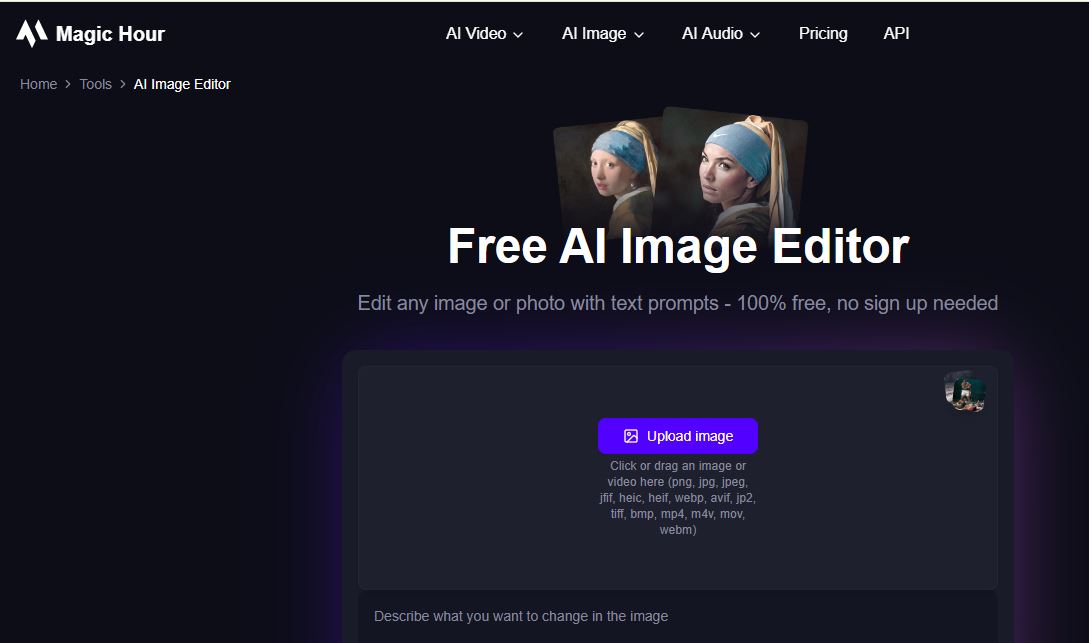
Magic Hour’s AI image editor is the strongest all-around option I tested for anyone who wants a free online AI photo editor that doesn’t dead-end at a single task. Upload a photo, describe the change in plain language, and the edited result comes back in seconds. No signup needed to start. No watermark on the output.
What separates Magic Hour from tools that only edit is what happens after the edit is done. If you want to upscale the result to 4K, you do it in the same session without re-uploading. If you want to animate the edited photo, or swap a face, or add lip sync, those tools are one click away inside the same platform. No other tool on this list connects editing to a full content workflow that naturally.
The model selection is also unique. Free users get access to frontier models like Nano Banana and Qwen Edit for prompt-based editing, while paid plans unlock Nano Banana Pro, Seedream, and additional engines, so you’re never limited to a single model’s style or strengths. I tested batch generation, generating up to 16 variations from a single prompt, and it worked exactly as advertised.
Pros:
- Genuinely free to use with no signup, no watermark, and no download required
- Multiple frontier image models in one place, not locked to a single engine
- Batch generation: up to 16 variations per prompt for fast comparison and testing
- One-click next steps: upscale to 4K, animate, or add lip sync directly from the edit result
- Credits never expire on any plan, including free
- Parallel generations with no concurrency cap on paid plans
- Most edits complete in under 10 seconds for standard prompt types
- Full API access matching the web app, useful for teams building automation
- Weekly feature releases keeping the model lineup current
- Clear data policy: uploads are not used for model training and are deleted from active storage automatically
Cons:
- Daily edit volume on the free tier is limited; higher output needs a paid plan
- Some of the newest or highest-resolution model options are available only on paid tiers
- First-time users with no prior experience with prompt-based editors may need a few tries to write prompts that produce exactly what they picture
If you need a free tool that handles a real range of editing tasks, delivers clean outputs, and then lets you keep working without switching apps, this is the one I kept coming back to.
Pricing: Free with no signup and no watermark. Creator plan is $15/month, or $10/month billed annually. Pro plan is $39/month. Business plan is $99/month.
2. Photopea
Photopea is a browser-based editor that runs entirely in your browser with no account and no software installation. Its interface mirrors Photoshop closely, which makes it the go-to free option for anyone who learned photo editing on desktop software and doesn’t want to re-learn an entirely new interface.
Pros:
- Opens PSD, AI, and Sketch files natively in the browser, which most online editors can’t do
- AI features, including generative fill and content-aware object removal, powered by Stable Diffusion
- Genuinely watermark-free exports on the free tier, supported by unobtrusive ads
Cons:
- Steep learning curve if you haven’t used layer-based editing software before
- AI generation quality trails behind dedicated AI-first platforms on complex prompt edits
- Interface feels dense compared to simpler drag-and-drop editors
<cite index=”39-1″>Photopea runs entirely in your browser and opens Photoshop PSD files natively. It added AI-powered features in 2025, including generative fill, AI object selection, and content-aware removal.</cite> If you need manual control alongside AI tools, it’s the strongest genuinely free option in that category.
Pricing: Free and ad-supported. No paid plan needed for full feature access.
3. Canva
Canva is the most widely used free design tool available, and its photo editing features have grown into a real capability for social and marketing content creators.
Pros:
- <cite index=”39-1″>The free tier exports at full resolution without watermarks on standard editing tasks</cite>
- AI tools including background removal, object erasing, and text-prompted edits are accessible on the free plan
- Combines photo editing with design templates, so you can go from edited photo to finished social post without switching tools
Cons:
- AI editing quality on complex tasks like detailed background swaps trails behind dedicated AI-first editors
- Best suited to creators already using Canva for design, rather than standalone photo editing
- Some advanced AI tools are gated behind Canva Pro
If you’re already living in Canva for design work, adding AI photo editing to that workflow is a natural step that saves you from opening a separate tool.
Pricing: Free with full-resolution exports on standard edits. Canva Pro unlocks additional AI features.
4. Adobe Firefly
Adobe Firefly’s web editor brings generative fill and prompt-based editing to a free browser experience, with the significant advantage that it’s trained on licensed and public domain content, which matters for commercial work.
Pros:
- Generative Fill handles complex object removal and background extension with strong results
- Trained on licensed material, relevant to teams with legal or content-provenance requirements
- Free tier gives 25 generative credits per month, enough to test quality seriously
Cons:
- <cite index=”36-1″>Adobe Firefly is a close second on quality but falls behind on free monthly limits</cite> compared to more generous free tiers
- Full capabilities are much easier to access inside the Creative Cloud subscription than through the standalone web tool
- 25 monthly credits disappear quickly if you’re iterating through several prompt variations on one image
For teams that specifically need content-provenance assurance on commercially published work, Firefly’s licensing approach is worth the narrower free tier.
Pricing: 25 free generative credits per month on the standalone web tool; full access bundled into Creative Cloud subscriptions.
5. Pixlr
Pixlr sits between a traditional manual editor and an AI-first tool, with a familiar browser-based interface that adds AI background removal, object erasing, and generative fill on top of standard layer and adjustment controls.
Pros:
- No account required for basic editing tools in the browser
- Combines familiar Photoshop-style controls with AI shortcuts, useful for users who want both
- Background removal and object erasing are available without a paid plan
Cons:
- <cite index=”38-1″>The free version runs in any browser and includes about 20 AI credits per month plus three saves per day</cite>, which is limiting for regular use
- Watermarks apply to some free tier outputs depending on which features you use
- AI generation quality trails behind AI-first platforms on open-ended prompt edits
Pixlr is the right choice if you want a free browser editor that blends traditional manual control with AI shortcuts, rather than a fully prompt-driven experience.
Pricing: Free tier with limited AI credits and daily saves; paid subscription tiers unlock more credits and watermark-free exports.
6. Remove.bg
Remove.bg doesn’t try to be a full photo editor. It does exactly one thing: background removal. And within that single task, it remains one of the cleanest options available for free, particularly on complex edges like hair and transparent objects.
Pros:
- Best-in-class background removal for detailed edges on the free tier
- No signup required; paste or upload and download the result instantly
- Reliably consistent on a single specialized task
Cons:
- Free tier downloads are at reduced resolution, full resolution requires a paid plan
- No other editing features; you’d still need a separate tool for anything beyond background removal
- Not suitable as a general-purpose editor
If background removal is your specific need and you’re fine with reduced-resolution free output, Remove.bg is the fastest and most frictionless option on this list for that single task.
Pricing: Free downloads at reduced resolution; paid plans unlock full resolution and bulk processing.
7. Freepik AI
Freepik’s AI photo editor is built specifically for creatives and marketers who want prompt-based editing with design integration, connecting AI edits directly to Freepik’s asset library.
Pros:
- Prompt-based editing connected to a large asset library, useful for replacing backgrounds with scenes rather than blank fills
- Free credits on signup with no watermark on outputs within the credit allowance
- Well-suited to marketing content where edited photos need to match branded visual styles
Cons:
- Credits on the free tier are limited, and creative or iterative use runs through them quickly
- More useful if you’re already using Freepik for assets; less compelling as a standalone editor
- Output on some complex prompt types is less precise than dedicated AI-first editors
If your editing work sits within a larger content creation workflow that already involves Freepik assets, the integrated approach saves a meaningful amount of switching between tools.
Pricing: Free credits on signup; further use requires upgrading to a paid subscription.
8. Upsampler
Upsampler offers prompt-based photo editing in the browser with no signup and no watermarks, powered by Qwen Image Edit. The specific value proposition is zero friction: no account, no card, no watermark, just a prompt and a result.
Pros:
- <cite index=”36-1″>No signup, no watermarks, and no software installation needed; editing happens in the browser with free daily GPU minutes</cite>
- Handles a wide range of prompt-based edits, from color changes to object removal to style transfers
- Free daily GPU allocation refreshes without any account management
Cons:
- Daily GPU minutes are limited, which caps how many edits you can complete in one session
- Less workflow integration than platforms with editing, upscaling, and animation in the same place
- Output quality depends on prompt precision; vague prompts return less targeted results
For a genuine no-commitment free trial of prompt-based editing before you sign up anywhere, Upsampler removes all the usual barriers.
Pricing: Free with daily GPU minutes; additional usage may require upgrading, though a paid tier isn’t required to start.
9. Clipdrop
Clipdrop, originally developed by Init ML and later acquired by Stability AI, offers a suite of focused AI editing tools, including background removal, object removal, and image cleanup, with an emphasis on clean, fast results on single tasks.
Pros:
- Fast, focused tools with strong results on object and background removal specifically
- Clear, single-purpose interface that doesn’t require learning a complex feature set
- Batch processing available for teams handling volume
Cons:
- <cite index=”39-1″>Free-tier output includes a watermark on some tools</cite>, which limits its use in deliverables without upgrading
- Less suitable for open-ended creative prompt editing compared to platforms built around generative models
- Fewer workflow extensions beyond the core cleanup and removal tools
Clipdrop is a practical pick for specific cleanup tasks, particularly on product photography, though the watermark limitation on the free tier is a real constraint for anyone who needs production-ready outputs before paying.
Pricing: Free tier with watermarks on some tools; paid subscription unlocks watermark-free exports and batch tools.
10. Phot.AI
Phot.AI positions itself as an all-in-one retouching suite, combining portrait enhancement, background replacement, object removal, and AI image generation in one browser-based tool aimed at content creators without a design background.
Pros:
- Wide range of retouching tools consolidated in one interface, reducing the need to switch between specialized apps
- Portrait enhancement and skin retouching features are well-suited to headshots and lifestyle photos
- AI image generation available within the same tool for creating from scratch or extending existing photos
Cons:
- Free tier credits are limited and some of the more useful tools require a paid plan to access fully
- Output quality on complex edits is decent but not consistently at the top tier compared to AI-first platforms
- Interface has more options than strictly necessary for simple one-off edits, which can feel heavy for quick tasks
If you want a single free tool that covers portrait retouching, background replacement, and basic generation without switching apps, Phot.AI covers that range reasonably well on a free plan for light use.
Pricing: Freemium with limited free credits; paid subscription unlocks more credits and advanced tools.
How We Chose These Tools
I evaluated each platform with the same three test cases: a portrait needing skin cleanup and background replacement, a product photo requiring background removal with a complex edge, and an open-ended prompt edit changing the color of a specific object in a scene. Every test ran at least twice.
For ranking, I weighted five factors roughly in order of importance: whether the free tier produces genuinely usable, watermark-free output; output quality at full zoom on the test cases; how quickly the edit completed from upload to download; whether any account or signup was required before a first real result; and what, if anything, the platform offered beyond the single edit step. I treated “free” strictly, only counting tiers where you could download a clean, full-quality result without paying.
The Market Landscape and Emerging Trends
The biggest shift in 2026 is that prompt-based editing has caught up with click-based tools for most everyday tasks. <cite index=”31-1″>According to G2’s 2026 category data, AI image tools average a 9.18 out of 10 likelihood-to-recommend score, the highest of any software category tracked that year.</cite> That number reflects real user satisfaction, not just novelty.
A second trend is what I’d call the free-tier arms race. The clearest differentiator now isn’t features. It’s what you actually get before paying. Platforms that give a genuinely useful free experience, real edits at full resolution with no watermark, are gaining users faster than platforms with more features but heavier upsell friction.
The third trend, worth noting for anyone evaluating tools seriously, is workflow bundling. Users who start with a standalone editor are increasingly moving to platforms that connect editing to upscaling, generation, animation, and publishing in the same session, since managing four separate tools for one piece of content is a workflow problem that no amount of individual tool quality solves.
Final Takeaway
For most users who want a free online AI photo editor that handles prompt-based editing and then lets them keep working on the result, Magic Hour is the strongest option I tested. No signup, no watermark, and a one-click path to upscaling, animation, or further editing without switching tools.
For users who want Photoshop-level manual control without paying, Photopea is the closest free equivalent. For everyday social media and design work, Canva’s free tier covers most editing tasks cleanly. For a single focused task like background removal, Remove.bg is the fastest no-friction option, though the resolution cap on free downloads is a real limitation.
I guarantee at least one of these tools will fit what you’re trying to do. Start on the free tier, run your actual use case, and let the output quality tell you whether upgrading is worth it.
FAQ
What is the best free online AI photo editor with no watermark in 2026?
Magic Hour delivers watermark-free photo editing with no signup required. Photopea and Upsampler also provide clean exports on their free tiers. Canva offers watermark-free downloads on standard edits. The key variable across all tools is exactly which features are included in the free tier, so testing with your specific use case matters.
Do I need to create an account to use a free AI photo editor?
Not always. Magic Hour, Photopea, Remove.bg, and Upsampler all allow editing and downloading without creating an account. Canva, Freepik, and Phot.AI require signup to access their free tiers.
Can I use free AI photo editor outputs in commercial projects?
It depends on the platform and plan. Many platforms restrict commercial use to paid tiers. Always check the terms of the specific plan you’re using before publishing edited images in ads, client work, or any commercial context. On Magic Hour, paid subscribers hold full commercial rights to edited outputs.
How does prompt-based editing work?
You describe the change you want in plain language, such as “change the wall color to warm white” or “remove the car in the background,” and the AI applies the edit while keeping the rest of the image consistent. Quality depends on how specific the prompt is and which underlying model the platform uses.
What’s the difference between a photo editor and an AI image generator?
A photo editor starts with an existing image and modifies it based on prompts or manual tools. An AI image generator creates a new image from a text description, starting from nothing. Many platforms now offer both in the same interface, including Magic Hour, Canva, and Phot.AI.